Arduino DC motor tutorial with L298N: setup, wiring, and code
Overview
Learn how to connect and control DC motors with Arduino using an L298N motor driver. This tutorial covers the module’s pinout, external power wiring, forward/reverse rotation, and speed control with pulse width modulation (PWM).
Key topics covered:
-
L298n overview: driver internals explained.
-
Diagram: pinout and wiring explained.
-
Direction control: switching between forward, reverse, coasting, and braking.
-
PWM speed control: adjusting the motor’s power with PWM.
-
Code examples: explained line by line
-
Troubleshooting: diagnosing motors that won’t start etc.
Understanding the L298N motor driver
The L298 from STMicroelectronics contains two H-bridges. Each bridge switches the polarity across one motor, so you can drive two motors independently in either direction.
Arduino supplies the control signals. The external supply provides the motor power. Never connect a motor directly to an Arduino I/O pin.
The module exposes these connections:
| Connection | Purpose |
|---|---|
OUT1, OUT2 | Motor A terminals |
OUT3, OUT4 | Motor B terminals |
IN1, IN2 | Motor A direction |
IN3, IN4 | Motor B direction |
ENA, ENB | PWM control for motors A and B |
VCC | Positive motor supply input; labeling varies |
GND | Shared motor supply and logic ground |
5V | Regulator output |
Wiring the L298N to Arduino
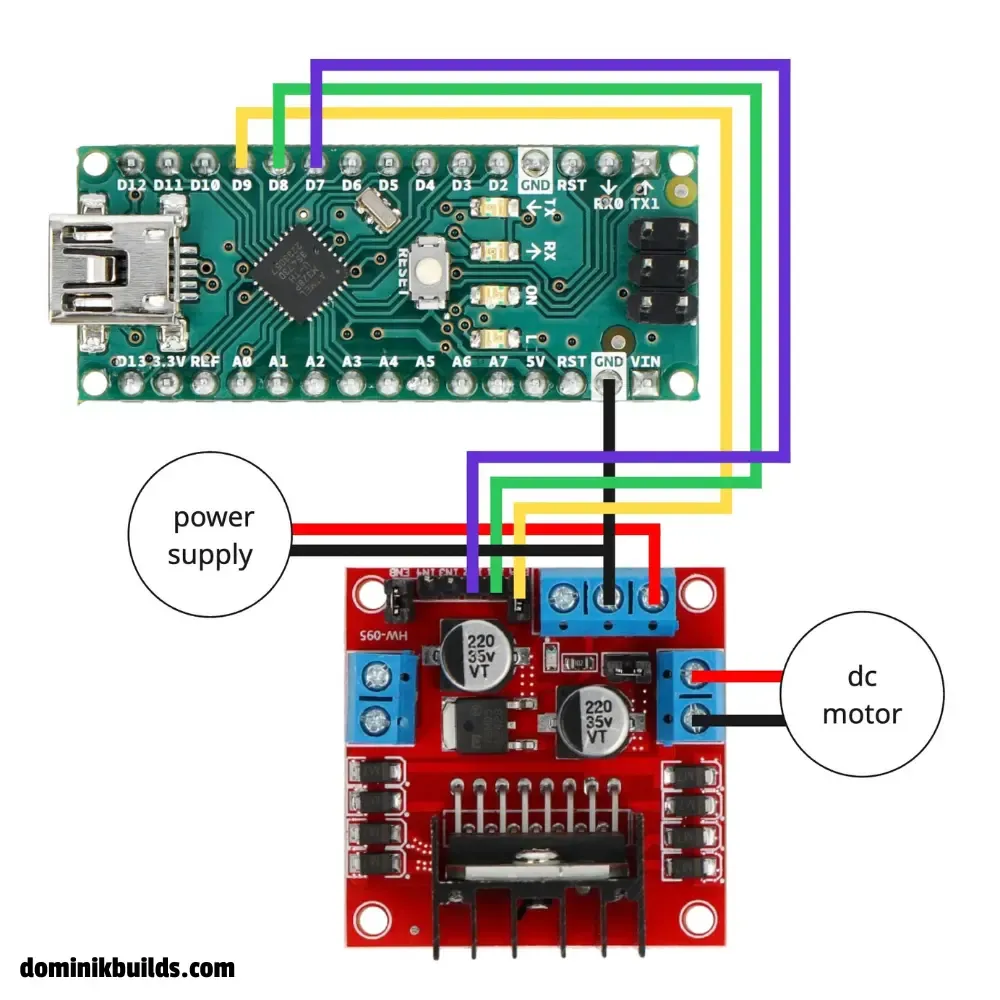
| L298N connection | Connect to |
|---|---|
ENA (jumper removed) | Arduino D9 (PWM) |
IN1 | Arduino D8 |
IN2 | Arduino D7 |
OUT1, OUT2 | The DC motor’s two wires |
| Motor supply input | External motor supply positive |
GND | Common ground |
ENB (jumper removed) | GND to disable the unused channel |
Only channel A is used in the example.
Controlling motor direction
For the motor on channel A, direction depends on IN1 and IN2, while ENA enables or disables the bridge.
| Enable | Input 1 | Input 2 | Behavior |
|---|---|---|---|
| HIGH | HIGH | LOW | Rotate in one direction |
| HIGH | LOW | HIGH | Rotate in the opposite direction |
| HIGH | LOW | LOW | Brake |
| HIGH | HIGH | HIGH | Brake |
| LOW | Either | Either | Coast to a stop |
Coasting disables the bridge; braking electrically resists rotation.
“Forward” depends on your motor wiring and mounting. If a wheel turns the wrong way, disconnect power and swap that motor’s two output wires, or invert its direction in code.
How PWM speed control works
PWM repeatedly switches an output on and off. Its duty cycle is the fraction of time the signal stays high. Arduino’s analogWrite() uses values from 0 to 255 by default:
| Value | Duty cycle | Effect with PWM on ENA |
|---|---|---|
0 | 0% | Disable the bridge and coast |
128 | About 50% | Apply power for roughly half each cycle |
255 | 100% | Keep the bridge enabled |
This tutorial uses D9 for speed, leaving D8 and D7 as ordinary digital direction outputs. See Arduino’s PWM explanation.
A duty cycle of 50% does not guarantee half the motor’s maximum revolutions per minute (RPM). Speed also depends on load, supply voltage, and friction. Measuring and maintaining a target RPM requires feedback, such as an encoder. At a low duty cycle, a motor can hum without starting; test with a moderate value first.
Arduino code for one DC motor
No additional library is required. These two sketches use the same pin mapping as the diagram. Upload one sketch at a time, and open Serial Monitor at 9600 baud to see the messages.
Both sketches are also available on my source repository on GitHub.
Forward, stop, and reverse
The basic movement sketch runs the motor forward at full power for three seconds, coasts for 300 ms, runs in reverse for three seconds, and coasts again. The sequence repeats.
// forward at full speed
// stop
// reverse at full speed
// stop

const int ENA = 9;
const int IN1 = 8;
const int IN2 = 7;

void setup() {
  pinMode(ENA, OUTPUT);
  pinMode(IN1, OUTPUT);
  pinMode(IN2, OUTPUT);

  Serial.begin(9600);
}

void loop() {
  Serial.println("Forward - full speed");
  digitalWrite(IN1, HIGH);
  digitalWrite(IN2, LOW);
  analogWrite(ENA, 255); // 0 - 255
  delay(3000);

  Serial.println("Stop");
  analogWrite(ENA, 0);
  delay(300);

  Serial.println("Reverse - full speed");
  digitalWrite(IN1, LOW);
  digitalWrite(IN2, HIGH);
  analogWrite(ENA, 255);
  delay(3000);

  Serial.println("Stop");
  analogWrite(ENA, 0);
  delay(300);
}
analogWrite(ENA, 255) keeps channel A enabled at full duty cycle. analogWrite(ENA, 0) disables the bridge so the motor coasts. Increase both delay(300) stop intervals before testing if the motor keeps turning during the pause.
Accelerate and decelerate in steps
The acceleration sketch keeps the motor in the forward direction and steps through approximately 25%, 50%, 75%, and 100% duty cycle. It then steps back down to zero and repeats.
// Accelerate in 4 steps
// Decelerate in 4 steps


const int ENA = 9;
const int IN1 = 8;
const int IN2 = 7;

void setup() {
  pinMode(ENA, OUTPUT);
  pinMode(IN1, OUTPUT);
  pinMode(IN2, OUTPUT);

  Serial.begin(9600);
}

void loop() {
  // Set forward direction
  digitalWrite(IN1, HIGH);
  digitalWrite(IN2, LOW);

  // Accelerate in 4 steps
  Serial.println("Speed: 25%");
  analogWrite(ENA, 64);
  delay(500);

  Serial.println("Speed: 50%");
  analogWrite(ENA, 128);
  delay(500);

  Serial.println("Speed: 75%");
  analogWrite(ENA, 192);
  delay(500);

  Serial.println("Speed: 100%");
  analogWrite(ENA, 255);
  delay(1000);

  // Decelerate in 4 steps
  Serial.println("Speed: 75%");
  analogWrite(ENA, 192);
  delay(500);

  Serial.println("Speed: 50%");
  analogWrite(ENA, 128);
  delay(500);

  Serial.println("Speed: 25%");
  analogWrite(ENA, 64);
  delay(500);

  Serial.println("Speed: 0%");
  analogWrite(ENA, 0);
  delay(500);
}
The Serial Monitor messages say “Speed,” but the percentages describe PWM duty cycle, not measured RPM. A motor that cannot start at 64 can hum or remain still until the next step applies more power. Test with the shaft unloaded.
The pauses make both demonstrations easy to follow. In a robot that also reads sensors or responds to commands, replace blocking delay() calls with timing based on millis().
Voltage drop and heat
The L298 uses bipolar transistors, which lose a substantial voltage across the bridge. Expect a total voltage drop 1.8–4 V, depending on the motor’s current.
Don’t treat a module’s advertised “2 A per channel” as a guaranteed continuous working current. The chip lists 2 A per channel as an absolute maximum for DC operation; practical operation also depends on cooling and module construction. Check stall current and temperature, and stop testing if the driver overheats.
Don’t compensate blindly by increasing supply voltage beyond the motor’s rating. For low-voltage or battery-powered projects, choose a driver with lower losses and current protection suited to your motor.
Saved you some time? Support my work with a coffee. Thank you!

FAQ and troubleshooting
Why does my DC motor not spin?
Use a multimeter to check the external supply voltage and make sure all grounds are connected. Confirm that the motor is on OUT1 and OUT2, and that ENA, IN1, and IN2 connect to D9, D8, and D7. Check that the driver’s logic has a stable 5 V supply. With power disconnected, use continuity mode to check your wires. Start with an unloaded motor and a moderate duty cycle.
Why does the motor always run at full speed?
Remove the ENA jumper; it holds the enable input high. Check that the signal wire connects to the exposed ENA input and Arduino D9. The basic movement sketch intentionally runs at full power. Upload the acceleration sketch to test changing the duty cycle.
Why does Arduino reset when the motor starts?
Motor startup can pull the supply voltage down or introduce electrical noise. Keep the motor supply separate from Arduino’s USB power, connect a common ground, and check wiring.
Can I power the motor from Arduino’s 5V pin?
No. Use an external power supply for the motor. Its startup and stall current can exceed what Arduino can supply and damage the board.
Why does my motor hum and buzz?
Humming or buzzing is normal when controlling a motor with PWM. At a low duty cycle, such as 25%, the motor may not produce enough average torque to rotate smoothly. The PWM pulses can also cause vibrations that produce an audible buzzing or squealing sound.
Can L298N control a servo motor?
A standard hobby servo already contains its own motor driver and position controller. Connect it to an appropriate power supply and an Arduino control signal instead. See the Arduino servo motor tutorial for wiring and code.