How to store money in a database: Floats vs. cents vs. DECIMAL
The rules for storing money are short: never use floats, and pick either integer cents or DECIMAL. If you use JavaScript, there’s one more trap to watch for.
I once worked on a fintech project that stored monetary values however it pleased – as text, decimals, and even floats. I’ll spare you the details, but that system still ruins my sleep. I also spent far too long arguing with LLMs that kept overengineering a fix. This post saves you that time.
Why you should never store money as a float
Here’s the textbook example: what’s 0.1 + 0.2?
// JavaScript
console.log(0.1 + 0.2); // 0.30000000000000004
# Python
print(0.1 + 0.2) # 0.30000000000000004// Rust
println!("{:.17}", 0.1_f64 + 0.2_f64); // 0.30000000000000004All three languages agree, and all three are wrong.
Floats are approximations. That might be obvious to some, but I didn’t know it for the first four years of my career as a software engineer.
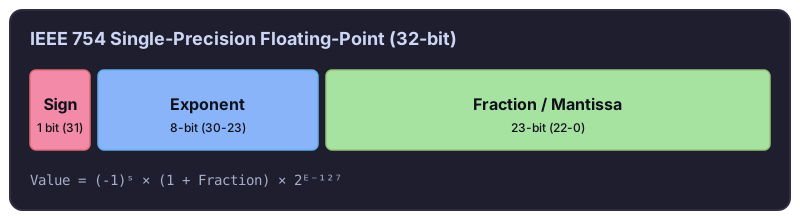
The languages agree because they all follow the IEEE 754 standard. It stores a number as a sign bit, an exponent, and a mantissa (the significant digits). Most decimal fractions, like 0.1, have no exact binary representation, so they get rounded:
- Float (single precision, 32 bits) – about 7 significant decimal digits
- Double (double precision, 64 bits) – about 15–16 significant decimal digits
Option 1: Store money as integers (cents)
If you’re still designing the system, pick integers. Store $9.99 as 999 cents.
Integer math is exact, and the pattern scales: Stripe’s API represents amounts in the smallest currency unit.
If you go global, remember that not every currency splits into 100 subunits. The Japanese yen has none, and the Kuwaiti dinar has 1,000 fils. Store the currency alongside the amount. Handling that is still far less work than fighting floating-point errors.
Use BIGINT, not INTEGER. A 32-bit INTEGER tops out at 2,147,483,647 cents, which is only about $21 million. That’s less than you’d think once you sum up balances or store amounts in currencies like the Indonesian rupiah. BIGINT goes up to about 9.2 quintillion, which is enough for anything.
Option 2: Use NUMERIC or DECIMAL columns
For systems already in production, NUMERIC is usually the better choice, since switching to it takes less refactoring than converting every value to cents.
NUMERIC and DECIMAL are the same type. Database vendors named it differently before the SQL standard settled on both.
You choose the precision (total digits) and scale (digits after the decimal point). For example, NUMERIC(10, 2) stores up to 10 digits, two of them after the decimal point, so the largest value is 99,999,999.99.
Both NUMERIC and integers solve the precision problem. But if you use JavaScript, there’s a catch.
How JavaScript turns NUMERIC into a bug
Say your table stores price and shipping_cost, both as NUMERIC, and you calculate the total before charging the customer:
| product_id | price | shipping_cost |
|---|---|---|
| 123 | 99 | 10.99 |
const product = await client.getProduct(123);
const totalPrice = product.price + product.shipping_cost;

await billingService.charge(userId, totalPrice);

console.log(totalPrice); // "9910.99"
You just overcharged the customer by $9,801.
The database driver returned both values as strings, and JavaScript’s + concatenates strings: "99" + "10.99" is "9910.99".
This isn’t the database’s fault. JavaScript has one number type, number, which is a 64-bit double with only 15–16 digits of precision. PostgreSQL’s NUMERIC can hold up to 131,072 digits before the decimal point. There’s no safe way to fit that into a number, so drivers like pg return strings to preserve the exact value.
How to handle money in JavaScript
Don’t write your own parsing wrappers. Lightweight, well-tested libraries solved this years ago: decimal.js, big.js, and bignumber.js.
Here’s the same calculation with decimal.js:
import Decimal from "decimal.js";

const { price, shipping_cost } = await client.getProduct(123);
const totalPrice = new Decimal(price).plus(shipping_cost);

await billingService.charge(userId, totalPrice.toString());

console.log(totalPrice.toString()); // "109.99"
Use BigInt for integer cents
If you store cents in a BIGINT column, you hit the same string trap. BIGINT goes beyond Number.MAX_SAFE_INTEGER (2^53 − 1), so pg returns it as a string too.
You don’t need a library here. JavaScript has a built-in BigInt type for arbitrary-size integers:
// price: "9900", shipping_cost: "1099"
const { price, shipping_cost } = await client.getProduct(123);
const totalPrice = BigInt(price) + BigInt(shipping_cost);

console.log(totalPrice); // 10999n
Keep two limits in mind:
-
No decimals –
BigIntdivision truncates, so10999n / 2nis5499n. Decide explicitly who gets the leftover cent when you split amounts. -
No mixing with
number–10999n + 1throws aTypeError, andJSON.stringifycan’t serialize aBigInt. Convert with.toString()at API boundaries.
TL;DR
- Never store monetary values as floats or doubles.
- Store money as
NUMERIC/DECIMAL, or asBIGINTin the smallest currency unit (cents). - In JavaScript, expect both to arrive as strings. Do the math with
decimal.jsforNUMERIC, or with the built-inBigIntfor cents.
Picking primary keys for the same tables? See UUID v4 vs. v7 vs. Nano ID.